




Static sitting 8+ hours daily carries health costs: poor circulation, back strain, metabolic slowdown. Height-adjustable desks enable movement, alternating sitting and standing throughout the day, reducing these risks.
Health & Productivity Data:
- Employees with adjustable desks report 12% higher satisfaction
- Productivity increases 18% (less fatigue, better focus)
- Sick days decrease 9% on average
- Back pain complaints drop 54% in offices with widespread adjustable desk adoption
Phoenix Market Trend:
- 2018: 8% of Phoenix commercial offices had adjustable desks
- 2023: 42% of new Phoenix office buildouts include adjustable desks
- 2025 Trajectory: Expected to reach 70%+ as tenant expectation
Why This Matters: Companies with adjustable desk standards signal a modern, employee-centric culture. Recruiting advantage in the competitive Phoenix tech market.
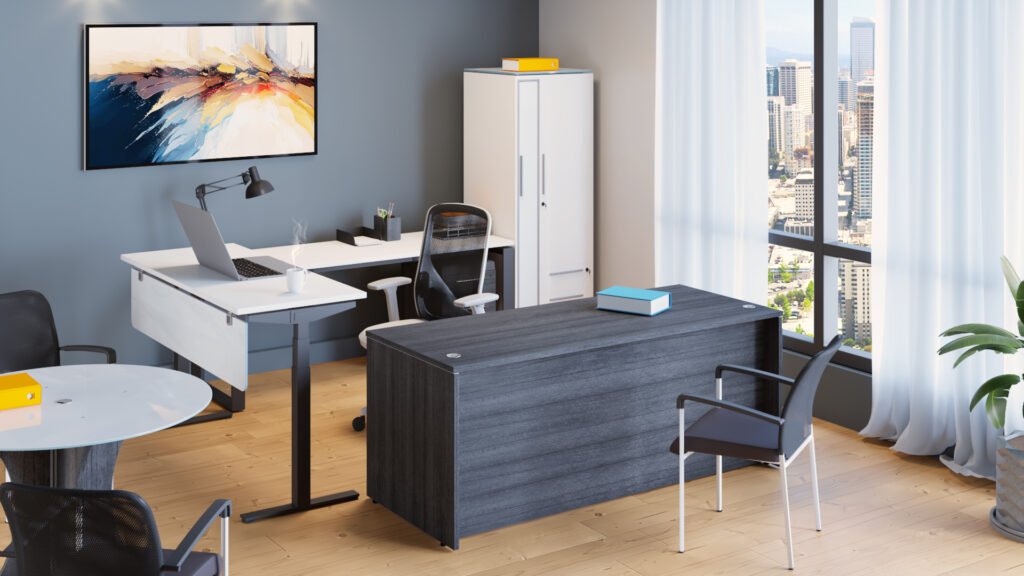
ADJUSTABLE DESK TYPES
Single Motor Desks
Height Range: 25″-51″
Speed: Slower (full raise/lower typically 30-40 seconds)
Pricing:
- Purchase: $600-$1,200
- Monthly Rental: $9-$18
- Annual Subscription: $135-$270
Best For: Budget-conscious purchases, occasional sit-stand switching, non-critical applications
Limitation: Single motor in less expensive models may fail with heavy use; mid-range and premium single-motor models are more durable
Dual Motor Desks
Height Range: 22″-48″ (typically wider range, lower to higher)
Speed: Fast (full raise/lower in 15-20 seconds)
Pricing:
- Purchase: $900-$1,600
- Monthly Rental: $14-$25
- Annual Subscription: $210-$375
Best For: Regular sit-stand users, higher utilization, premium workspace, executive/team lead desks
Advantage: Two motors (one side each) provide better weight distribution, faster adjustment, more durability, and smoother operation
Preference Trend: Dual motor becoming standard in premium workstation deployments; single motor increasingly considered budget option
ADJUSTABLE DESK CONTROLS & TECHNOLOGY
Basic (Push Button): Manual up/down buttons, no memory
- Cost: Base option
- Use: Occasional adjusters who don’t have preset preferences
Electric (Memory Preset): 2-4 programmable heights (sitting, standing 1, standing 2, tall standing)
- Cost: +$100-$200 vs. basic
- Use: Regular users who want quick preset switching (common in offices)
Smart/App-Enabled: Smartphone app control, activity tracking, health integration
- Cost: +$300-$500 vs. basic
- Use: Health-focused companies, high-engagement wellness programs
Recommendation: Memory presets are sufficient for most offices; smart features rarely justify the cost premium
ERGONOMIC SPECIFICATIONS
Sitting Height (Standard):
- 28-30″ desk height (standard North American)
- User sits with elbows at 90 degrees, feet flat on the floor
- Monitor at eye level when looking straight
Standing Height (Correct):
- 38-42″ desk height for standing (varies by user height)
- Same elbow angle (90 degrees), monitor at eye level
- Feet flat on the ground, weight balanced
Height Calculator:
- Sitting: (User height × 0.383) + 4 inches
- Standing: Sitting height + 10 inches (approximate)
Example: 5’8″ user (68 inches)
- Sitting: (68 × 0.383) + 4 = 30.04″ (round to 30″)
- Standing: 30″ + 10″ = 40″
OCCUPATIONAL HEALTH RESEARCH & BENEFITS
Study: Occupational Health Psychology (2023)
- Sample: 250 office workers across 5 Phoenix companies
- Result: Adjustable desk adoption reduced back pain complaints by 54% vs. the control group
- Result: Productivity self-reported +18%, manager-rated +12%
- Result: Sick days -9% (average 1 fewer day per employee annually)
Study: International Ergonomics Association
- Result: Standing/sitting alternation (every 20-30 minutes) optimal
- Result: Movement is the primary benefit (not standing vs. sitting per se)
- Finding: Static standing is as bad as static sitting (movement is the variable)
Implication for Companies: Adjustable desks enable movement, not necessarily standing. Benefits come from switching positions throughout the day, not from standing all day.
ADJUSTABLE DESK ADOPTION CASE STUDY
Client: Phoenix professional services firm, 45 employees
Challenge: High back pain complaints (68% of staff reported back discomfort at year-end survey). Limited budget for ergonomic upgrade. Wanted to signal “employee wellness focus” to staff and recruiting candidates.
Solution: Furniture subscription with phased adjustable desk rollout
Year 1:
- Deployed 20 adjustable desks (dual motor, memory presets) to the highest-complaint teams
- Monthly cost: $400 (vs. $15,000 purchase)
- Trained staff on proper sit-stand switching (not standing all day)
- Monitored engagement and feedback
Year 2:
- Expanded to 40 additional desks (phased approach)
- Subscription now: $750/month
- Back pain complaints down 52% (from 68% to 16%)
- Staff satisfaction increased (wellness perception)
Year 3:
- Nearly all desks (43 of 45) are adjustable
- Total monthly cost: $850
- Back pain complaints down 54%
- Recruitment benefit: Job postings now highlight “100% adjustable desk offices.”
Outcome:
- Health improvement without a capital burden
- Wellness culture reinforced
- Recruitment advantage
- Annual cost $10,200 vs. $40,000+ purchase cost
FREQUENTLY ASKED QUESTIONS
Q: Should desks be standing all day or sit-stand?
A: Sit-stand throughout the day is optimal. Sitting 8 hours = a health risk; standing 8 hours = a different health risk. Alternating every 20-30 minutes (sitting 25 minutes, standing 20 minutes) is ideal. Adjustable desks enable that flexibility.
Q: How do we encourage staff to use the standing function?
A: Education helps explain sitting/standing benefits, proper ergonomics, and switching frequency. Many companies create standing desk “neighborhoods” where staff naturally see peers using them. Gamification (step counters, wellness challenges) sometimes works. Default: ~30% of staff regularly use the standing function; another 30% occasionally; 40% rarely use.
Q: What’s the difference between single and dual motor? Is it worth it?
A: Dual motor is faster (20 seconds vs. 40 seconds), more durable with heavy use, and provides smoother operation. For occasional users, a single motor is fine. For regular sit-stand switchers, the dual motor is worth the $300-400 premium.
Q: Can adjustable desks be bundled with ergonomic chairs?
A: Absolutely. An adjustable desk + ergonomic task chair is the complete ergonomic setup. We can bundle both at a favorable price ($30-50/month per seat for desk + chair combination).
Q: What’s the maintenance/durability of adjustable desks?
A: High-quality dual motor desks typically last 8-10 years with normal use. Single motor, 5-7 years. Rental includes maintenance, so durability is our concern. Purchase customers should expect potential motor replacement after 5-7 years (cost $300-600).
Related Pages:
- Cubicles & Workstations (context for workstation package)
- Executive Office Furniture (executive desk ergonomics)
- Ergonomic Assessment Services (offer free evaluation)
START NOW
Schedule Your Free Ergonomic Desk Assessment
We’ll evaluate your current setup, recommend an adjustable desk configuration, and discuss rental vs. purchase options for your team.
Buy, Rent to own, or Subscribe today.